













BGChanger Video for Web Apps
- Subscription
- 4.8
- V1.0.0
AI video background changer and online video editing toolkit
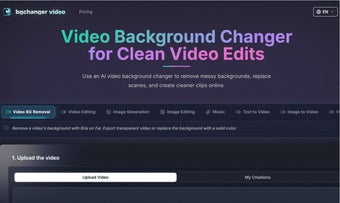
BGChanger Video is an online AI creative platform for video editing, video generation, image creation, and background replacement. It is designed for creators, marketers, e-commerce sellers, educators, social media teams, and small businesses that want to create high-quality visual content directly in the browser.
The platform brings together multiple AI-powered tools for modern content production. Users can change or remove video backgrounds, edit videos with AI, generate videos from text or images, create AI images, edit existing images, upscale video quality, control motion, extend video clips, and use video face swap workflows for creative production.
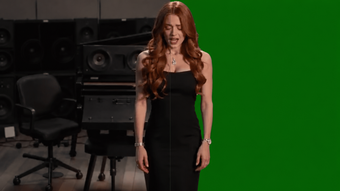
One of the core features of BGChanger Video is its AI video background changer. Users can upload a video, remove the original background, export a transparent result, or replace the background with a clean solid color such as white, black, green, blue, cyan, and more. This is useful for product videos, ads, tutorials, talking-head clips, social media posts, and green-screen-style workflows without needing a physical green screen.
Beyond background editing, BGChanger Video also supports broader AI video editing workflows. The video editing tools can help users transform source videos, adjust visual elements, and create new variations for creative projects, marketing campaigns, product showcases, and short-form content. This makes it easier to produce different versions of a video without starting from scratch every time.
For AI video generation, BGChanger Video includes text-to-video and image-to-video tools. Users can turn written prompts into video content or transform still images into motion-based visuals. These features are useful for social media creators, advertisers, designers, and teams that need fast visual concepts, promotional clips, or experimental creative assets.
The platform also includes AI image generation and image editing tools. Users can create new images, prepare visual assets, edit existing pictures, and generate backgrounds or creative references for video projects. This helps connect image creation and video production in one workflow.
BGChanger Video also offers video face swap tools for creative and entertainment use cases. With responsible use and proper rights, this feature can help users experiment with character concepts, social content, creative storytelling, and visual variations.
Additional tools such as video upscale, motion control, video extend, and music-related creation workflows make BGChanger Video a more complete AI media toolkit. Video upscaling can help improve lower-resolution footage, motion control can guide visual movement, and video extension can help make short clips longer or more complete.
Because BGChanger Video runs online, users do not need to install complex desktop editing software. The platform is suitable for people who want a simple browser-based way to create, edit, enhance, and transform visual content with AI.
BGChanger Video can be used for product demos, marketing videos, social media clips, ads, educational content, creator videos, brand assets, AI-generated visuals, and experimental media projects. It is a practical tool for anyone who wants to produce professional-looking video and image content faster with AI.
Loading…
%20(1)%20(1)%20(1).jpg)
App specs
Developer
License
Subscription
Version
1.0.0
Latest update
Platform
Web Apps
OS
Firefox
Language
English
Available languages
- English
- Chinese
BGChanger Video for Web Apps
- Subscription
- 4.8
- V1.0.0
User reviews about BGChanger Video
Have you tried BGChanger Video? Be the first to leave your opinion!
Add reviewTop downloads Video for Web Apps
Top downloads Video for Web Apps
Top downloads Video for Web Apps
Related topics about BGChanger Video
Latest articles

Quake gets a new expansion for its 30th anniversary

Frank Miller has a new favorite Spider-Man, and it’s the one from Brand New Day

Devolver Digital will become a private company again because creating value for investors is going to kill them

A classic video game that until now you could only buy on DVD is coming to Steam in September

Invincible – Superhero Roleplaying is out now: create your own heroes
Laws concerning the use of this software vary from country to country. We do not encourage or condone the use of this program if it is in violation of these laws. Softonic may receive a referral fee if you click or buy any of the products featured here.